Metadata Editor
Continued Development
Once the Duplicate imagery had been removed from the Archive Project, the next follow on was updating every image to have the real image capture date and location.
Trying to keep development simple, I elected to follow the design of the Duplicate project with a single .py and single .html file. Which was the wrong idea. The .py is nearly 7k lines… definitely due for an AI assisted refactor, but that is for another day.
The code was built to run on an M4 Max series Mac against a folder of .heic files. I was building the program for myself after all, so there are system design choices that reflect that.
Why Build?
With over 10k images from the Print & Negative process, I wanted a very specific tool to give me a way to manage the date and location. Eventually, the imagery would end up in Apple Photos. Apple Photos can auto generate little memories based on date or location. My goal was to give the imagery the best chance to be used in that pipeline.
Date was the easier of the two, just put a date! Using ExifTool to update specific fields that would help Apple Photos think an image was taken in 1972, or any other date.
Location was trickier, I eventually landed on using Apple Maps APIs to apply GPS data to each image. The image would then correctly appear in Apple Photos on the map. It also has the benefit of a wider search. You can use landmarks, addresses, or anything that apple maps would have.
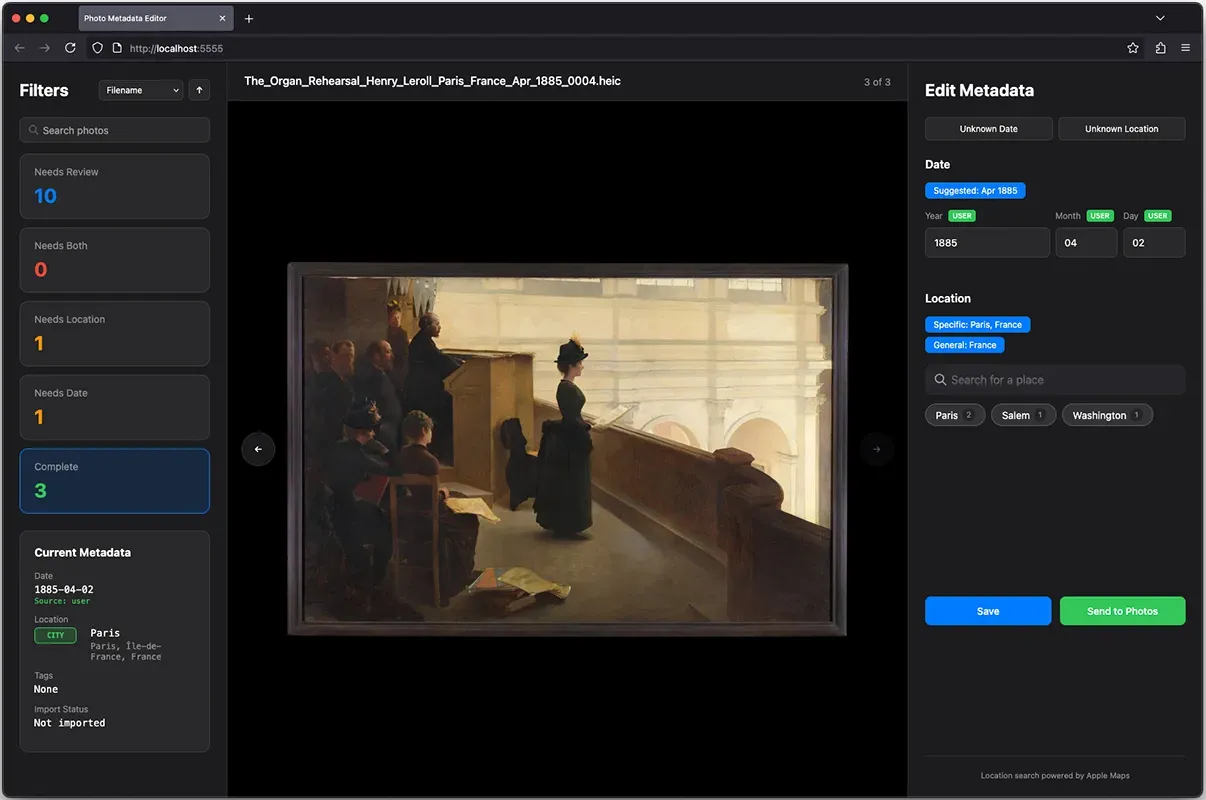
The UI evolved over time and there is a bit of feature creep, but attempts to give you all the information you need to determine what work needs to be done, what is already done, and how to fix.
Custom LLMs, or How I Learned To Love H100s
I tried to put as much information about each photo or negative into each file name for the Archive project. Who, what, when, where, why. But you quickly run into the issue that every file name is now all over the place. To solve, I thought, what is good at taking human words and parsing them?
Which led me down the path of putting a fine-tuned LLM inside the program. Its role is to take the file name, and provide suggestions as to the date the photo was taken, and where the photo was taken. At build time, a fine-tuned Mistral 7B model was the best option. But by the time you read this, I am sure there are much smaller and better models that could be implemented. How I found and fine-tuned the model can be found in the documentation section below.
In Practice
Quick video to walk through showing many of the little features. Click the filters, see the images, double click to see the grid, double click to see the single image, use the search functionality, sort by options, batch edit, see what the LLM offers for suggested date and location. Click to auto fill date, or search location and see how apple maps fills the info vs user update, save and how images move through the filters.
Documentation
Beyond the LLM and Apple Maps implementations, there is a LOT going on behind the scenes. If you are looking for deep dives, do I have a gift for you. I tried to notate everything as I went along (as I would most likely forget later) which resulted in a LOT of documentation. Feel free to click to view and peruse at your leisure - if that is what you are into. The Main documentation is more straight forward, the LLM documentation is a little more complicated with .py scripts and cloud gpus.
Main Documentation
- Setup Guide - Installation and configuration
- User Guide - Complete usage instructions
- Technical Reference - Architecture, troubleshooting, performance
- Pipeline Setup - Mac-to-Mac transfer system
- Development Notes - Design decisions and background
- Quick Reference - Keyboard shortcuts, design patterns, icons
- Mac B Undo Guide - Removal of tools and code on Mac B
LLM Advanced Tooling
- Advanced Tool Guides - Python programs used during development. Initial LLM testing, prompt tuning, synthetic data generation and finetuning on 8x H100 cloud gpus.
Casual Vibes
While it may appear that this was a super easy go, it took about a month of software development to get it all working. Because LLMs (are mostly) non-deterministic, little changes can have outsized impacts. Change one thing, Test. Change one different thing, Test. Test, Test, Test. And that was just the LLM I put inside the program, let alone the mess Claude, GPT, and Gemini can be at times. But, it was generally a good time, lots of learning, and renewed my deep appreciation for UI/UX developers. It is super difficult to get something to look good, while removing all other elements. Simple is so tricky.